
On this page 5 sections
Signing in step by step
The login form has three tabs, Email, Phone and ID, and a separate Google button above them. A Playbaze casino login with an email needs only the address and password, while the ID tab uses the account number received at registration.
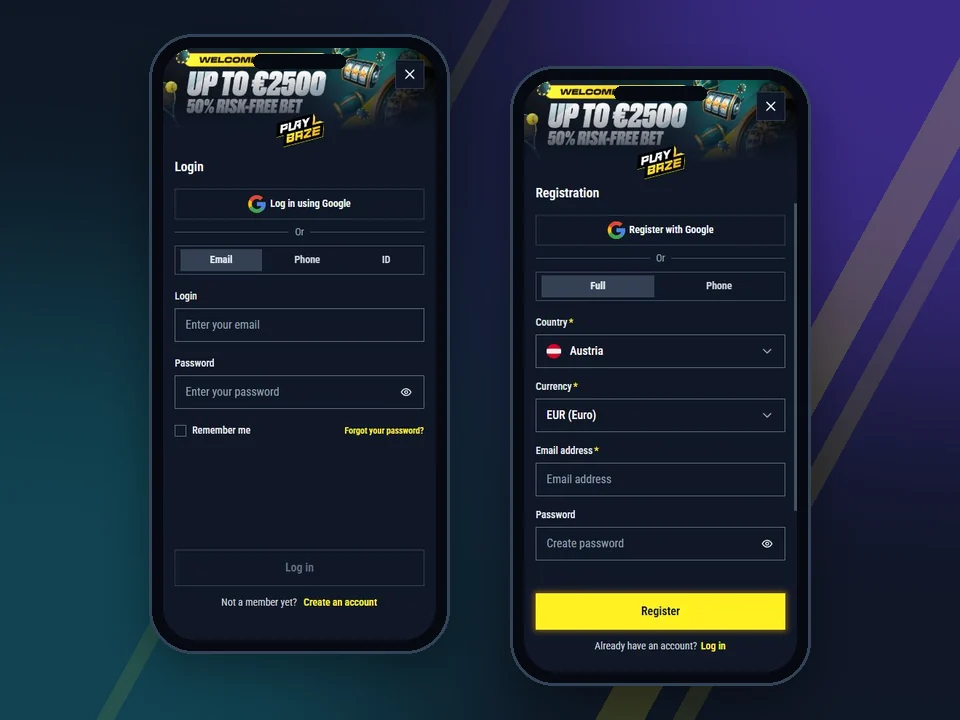
Tick Remember me on a personal device to keep the session active between visits. On a shared computer, leave the box empty and log out after the session, as login details stay confidential and should never be shared with anyone else.
Creating a new account
Open the Sign Up window and pick the full form, the phone option or Google: the Playbaze register form then asks for country, currency, email address and password, with an optional promo code field and the age and terms confirmation at the end.
- Press Sign Up in the header; the window opens with a Register with Google button and two tabs below it, Full and Phone, for a manual registration.
- In the Full tab, choose the country and the currency of the account. The currency becomes the main wallet and is used for all deposits, bets and payouts later.
- Type an email address and a password, then add a promo code if you received one; the field is optional and can be left empty during registration.
- Tick the box confirming that you are at least 18 years old and that you accept the Terms of Use and the Privacy Policy, then press the yellow Register button.
- Open the profile, fill in the personal data fields and tick Take part in Bonus offers, so deposits, bonuses and withdrawals can be processed without delays.
Currency options at registration include EUR, PLN, CZK, CAD, CHF, NZD and HUF. After a Playbaze sign up, the welcome package becomes available with the first deposit of €20 or more, and the offer is activated in the Bonuses section of the profile.

Sign-in methods compared
Each method leads to the same account, so the choice depends only on what is more convenient on a particular device. A Playbaze casino sign up through Google links the profile to that Google account, and later visits need one click on the same button.
| Method | What is needed | Typical use |
|---|---|---|
| Email address and password | Desktop and laptop | |
| Phone | Phone number and password | Mobile browsers |
| ID | Account number and password | Players who saved the ID from registration |
| A Google account | One-click access on a personal device |
Switching between tabs does not change the account data: the balance, bonuses and bet history stay the same. If one method is unavailable, use another one from the list or write to our team through the Contact Us page of this site.
Password recovery and account safety
The Forgot your password link under the password field starts the reset for the email or phone number linked to the account. Choose a new password that is not used on other websites, and change the email password too if someone else may have accessed it.
- Keep the password and the account number from registration private, since all bets placed from the account are treated as placed by the holder.
- Withdrawal codes and codes for changing the phone number are never passed to third parties, including people who introduce themselves as support staff.
- If login details may have reached a third party, inform support right away and change the username and password to stronger ones as soon as possible.
- An account that stays inactive for three months may be blocked; to restore access, write to the security team through the address on the contact page.
- A blocked account restricts access to all websites of the company until the security team completes the review and the account is unblocked again.
Security checks may include a request for documents or a short video call, and verification usually takes up to 72 hours. Once the review is finished, access to the account, the balance and the active bonuses returns in full.
Questions and answers
Which details do I need to log in?
An email address, phone number or account ID together with the password, or a Google account if the profile was created through Google.
What if I forgot my password?
Press Forgot your password under the password field and follow the reset instructions sent to the email or phone number linked to the account.
Can I register with a phone number?
Yes. The registration window has a Phone tab next to the full form, and Google registration is available as well.
Why can an account be blocked?
Accounts may be blocked after three months of inactivity, during verification or for security reasons. Access returns after the security team completes the review.